Explaining PipelineZ — diagram set
Five Excalidraw diagrams that walk from overview to detail, explaining how pz works. Every
code/YAML/SQL snippet in them is real content from templates/sample or the documented
contracts (docs/concepts/, docs/events.md).
Suggested reading order:
| # | Diagram | Tells the story of |
|---|---|---|
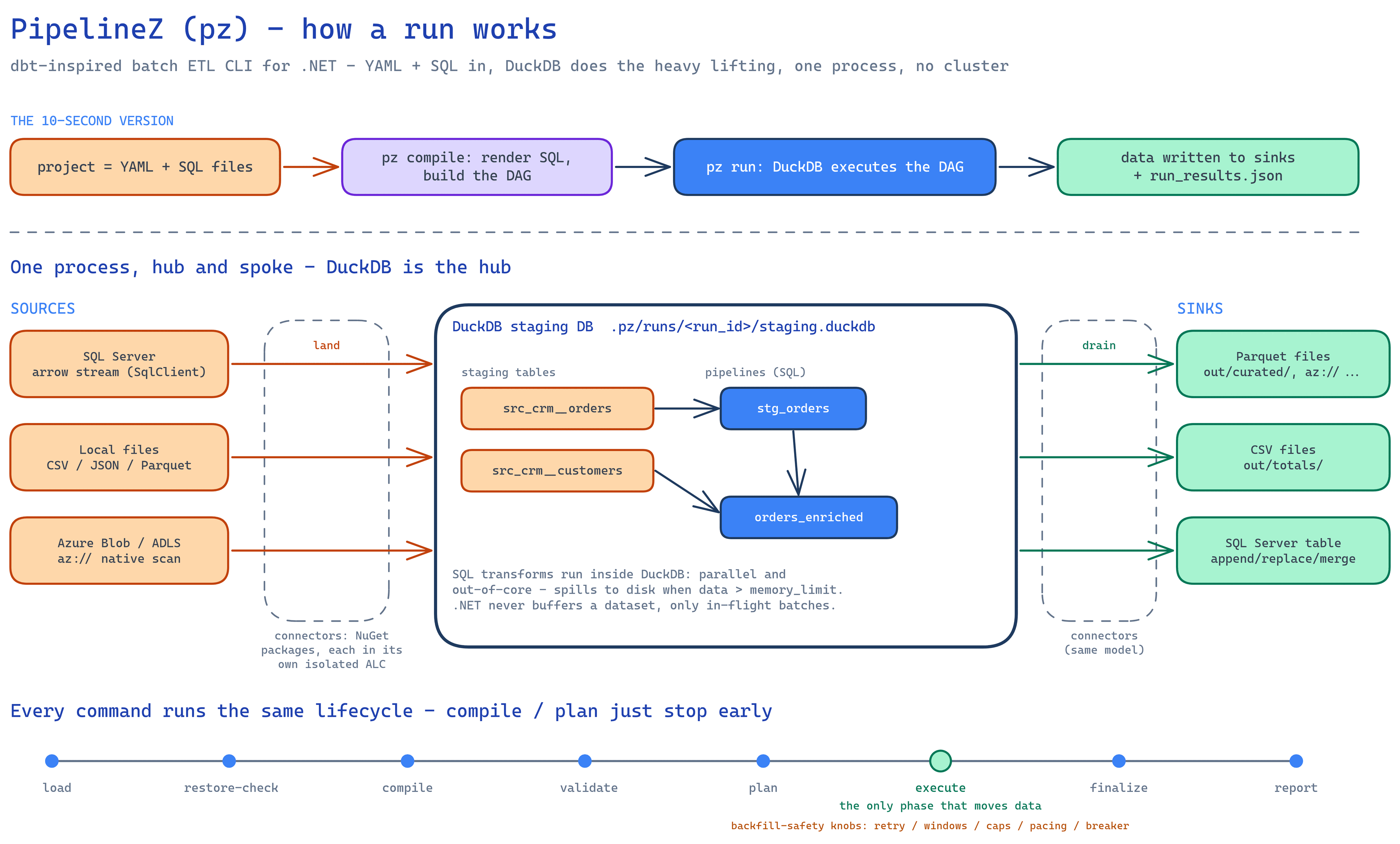
| 1 | 01 — Overview — PNG · .excalidraw |
The whole machine: YAML+SQL project → compiled DAG → DuckDB hub executes → sinks + run_results.json, plus the 8-phase lifecycle every verb shares |
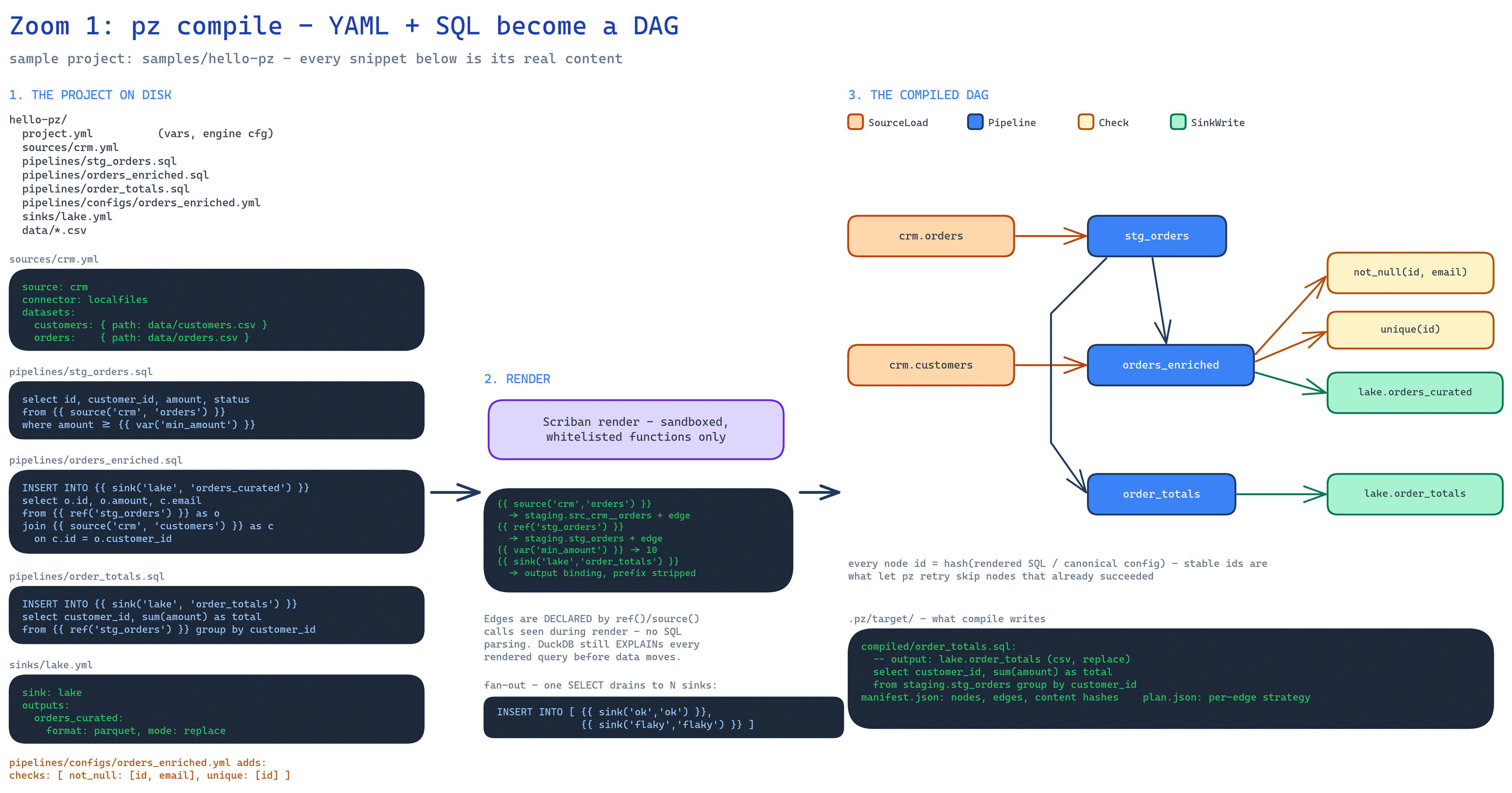
| 2 | 02 — Compile — PNG · .excalidraw |
Zoom 1: how ref()/source()/sink() calls in the sample template’s files declare the DAG edges — no SQL parsing — so each pipeline .sql reads as the whole E→T→L (source()/ref() in the FROM, the SELECT, load via an inline INSERT INTO {{ sink() }}, scalar or array for fan-out) — and what .pz/target/ contains |
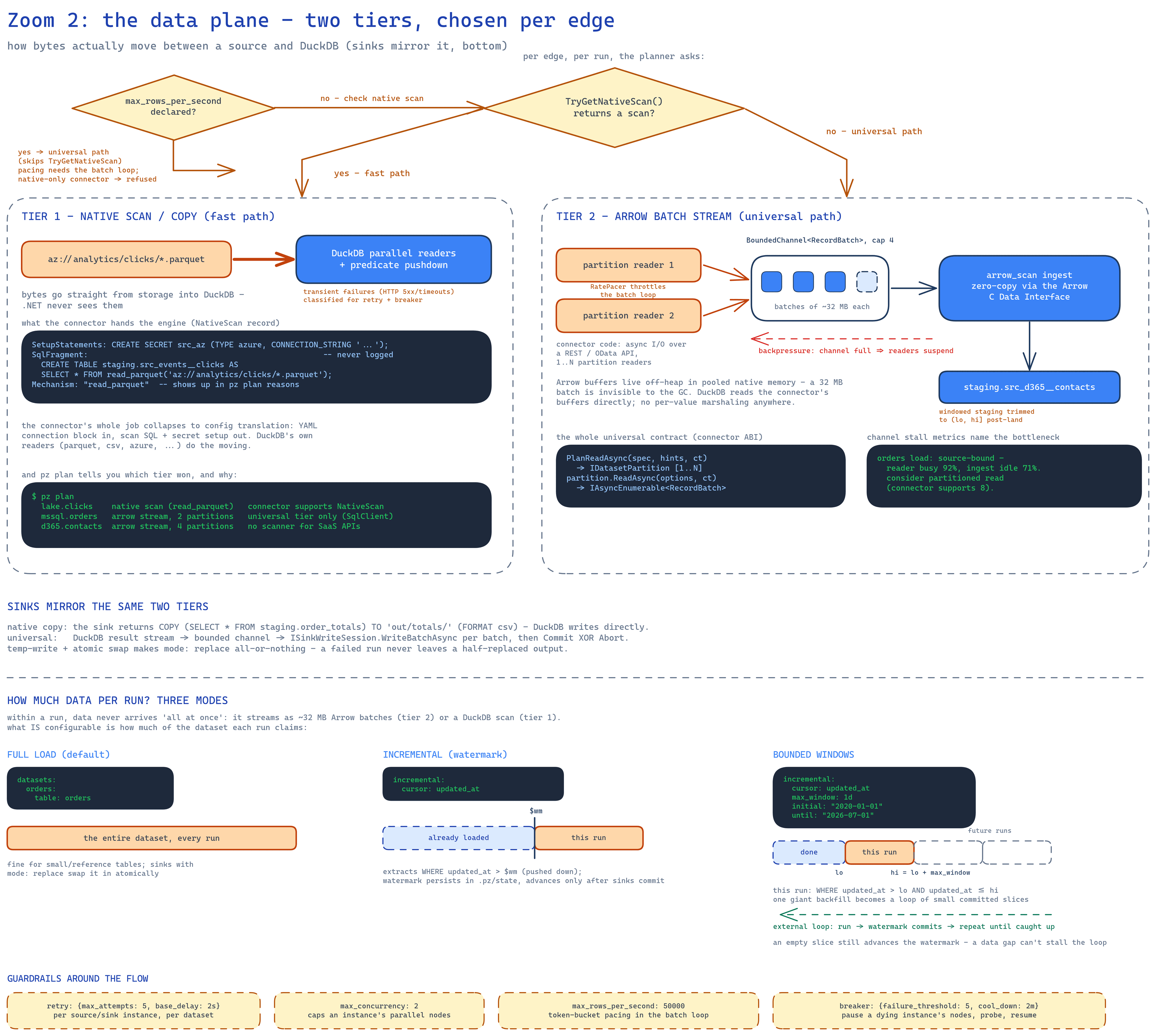
| 3 | 03 — Data plane — PNG · .excalidraw |
Zoom 2: the two-tier data plane — native scan/copy (bytes never enter .NET) vs the universal Arrow batch stream with bounded channels, backpressure, and stall-based bottleneck diagnostics — plus how much data each run claims (full / watermark / bounded windows) and the backfill-safety guardrails |
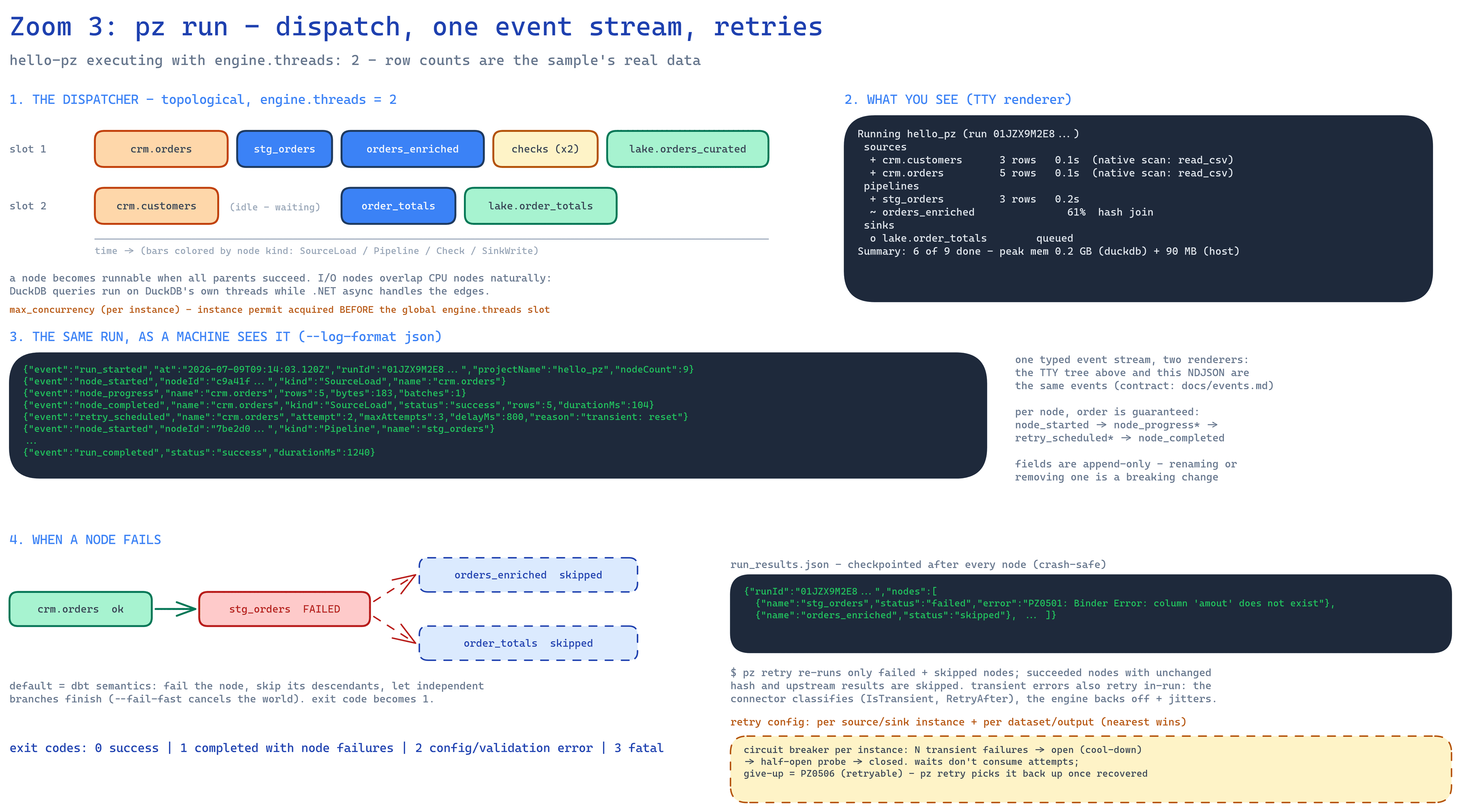
| 4 | 04 — Run lifecycle — PNG · .excalidraw |
Zoom 3: the topological dispatcher (engine.threads), the single typed event stream (TTY tree vs NDJSON), and failure/retry semantics (pz retry, exit codes) |
| 5 | 05 — Resilience & resume — PNG · .excalidraw |
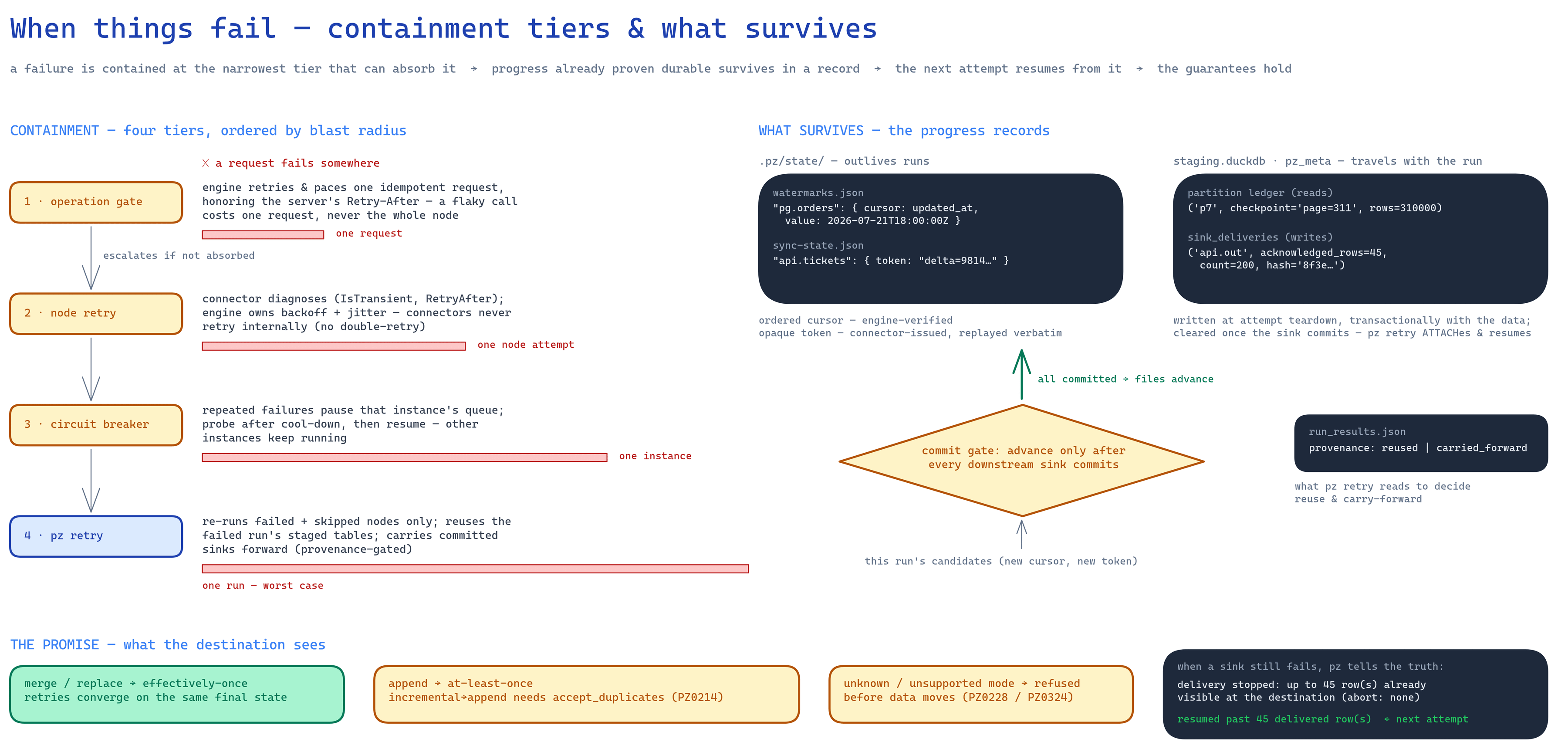
Zoom 4: what happens when things fail — the four resilience tiers by blast radius (operation gate → node retry → circuit breaker → pz retry), the progress records that survive a failure (watermark, sync state, partition + delivery ledgers, carried-forward sinks), the commit gate they all share, and the delivery-guarantee matrix |
Each diagram has these companion files:
NN-*.pngandNN-*-dark.png— pre-rendered exports of the same content, one per theme. The page above shows whichever matches your theme; either is ready to drop into slides.NN-*.md— companion explainer: what the diagram shows, the main idea, a plain-language guide through each section in the order the eye should travel, the key points to remember, and answers to common questions. Every concept is defined in place (what a DAG, watermark, bounded channel, circuit breaker, … actually is), so no prior background is needed. Reading the five.mdfiles in order is a self-contained tour of how pz works — useful on its own or as preparation for presenting the diagrams.
The examples are Microsoft-flavored (SQL Server, Azure Blob/ADLS) on purpose. Azure storage is
technically honest and shipped today: pz’s own builtin azureblob connector rides the native scan
fast path via DuckDB’s azure extension (az:// URLs) by default, and falls back to a universal
tier over the Azure Storage SDK when force_universal is set or the connector has no native path. SQL Server is universal-tier
only today — it streams Arrow batches over SqlClient; a native scan via DuckDB’s community mssql
extension is a designed-for future, not yet wired up. The universal path slide example is a
SaaS/OData API (Dynamics-style) — the kind of system no engine ships a scanner for, and exactly
the shape the builtin http connector now serves for real (pagination, auth, sync state,
checkpointed reads and writes). The planner picks per edge and pz plan records why. In-repo
builtin connectors today are LocalFiles, Postgres, S3, SqlServer, AzureBlob, MySql, and Http — all
shipping inside the pz tool itself, not as external NuGet installs a project has to restore.
To edit: download the .excalidraw source from the table above, open it at
https://excalidraw.com (File → Open) or with the VS Code Excalidraw extension, then re-export
both PNGs — the light one as-is, and the dark one with Export image → Dark mode — so the
page keeps matching the reader’s theme.
Colors mean the same thing on every slide:
| Color | Meaning |
|---|---|
| orange | sources / extraction / the data a run claims |
| blue (solid, white text) | pipelines and DuckDB doing runtime work |
| purple | compile-time machinery (pz compile, Scriban render) |
| yellow | checks, decisions, guardrails |
| green | sinks / success |
| pale blue, dashed | skipped / already loaded / not yet |
| red | failure |
| dark slate | real file, terminal, or event-stream content |