10. Meet pz
Nine articles of concepts deserve a payoff. This article introduces PipelineZ (pz) - a
lightweight, developer-first batch data pipeline engine for SQL-based ETL/ELT, powered by
DuckDB, that runs anywhere without requiring a data platform - and rebuilds Sunrise Bakery’s
pipeline with it, for real. As we go, watch how each idea from Part I shows up as a
concrete feature: this article is deliberately a reunion tour.
One framing sentence to hold onto: a pz project is one connections.yml (the places your
data lives, with credentials) plus SQL files (the transformations, and the reads and writes
they perform) - and pz compiles those files into a dependency-ordered DAG and executes
it. No server, no database to administer, nothing that isn’t checked into git.
Installing and scaffolding
Section titled “Installing and scaffolding”pz installs as a standard .NET global tool and scaffolds a complete, runnable project:
$ dotnet tool install --global pz$ pz init sunrise --template sample$ cd sunrise && pz run --allThe scaffold runs offline against bundled CSVs in seconds - article 9’s “tiny sample
project” habit, built into the first command you learn. --template sample is what asks
for it; a bare pz init scaffolds the minimal template - project.yml and
connections.yml - which is what you want once you are pointing at your own data rather
than reading someone else’s demo. There are five built-in templates in all (minimal,
sample, incremental, http, sqlserver); pz init --list-templates shows them.
The core concepts
Section titled “The core concepts”pz’s vocabulary is small, and every term maps onto Part I:
- Connection - a place with credentials: a folder of CSVs, a Postgres database, an S3
bucket, a SQL Server. Declared once in
connections.yml. - Entity - a named thing in that place, named the way the place names it: a table
dbo.orders, a file pattern, an API resource. - Direction - reading and writing aren’t different kinds of config; they’re different
function calls against the same connection:
source()reads an entity,sink()writes one. One connection can be both read and written. - Pipeline - one SQL file under
pipelines/, producing one table named after the file. - Check - a data-quality assertion attached to a pipeline (article 7’s one-liners).
- DAG, nodes, runs - exactly article 6’s objects, made executable. There are four node kinds: SourceLoad (land a dataset), Pipeline (run one SQL step), Check (run one assertion), SinkWrite (write one output).
Sunrise Bakery in five files
Section titled “Sunrise Bakery in five files”Here’s the bakery’s pipeline, complete. First, the places:
# connections.yml - every place pz talks to, declared onceshop:  connector: postgres  host: ${SHOP_DB_HOST}          # secrets come from the environment (article 9)  database: shop  entities:    orders:      read:        columns: { id: bigint, customer_id: bigint, store_id: bigint,                   amount: double, status: varchar, updated_at: timestamp }
crm:  connector: localfiles          # the CRM's nightly CSV export drop  root: exports/crm
lake:  connector: localfiles          # where results land; every write goes under this root  root: out
Then the transformations - article 5’s layers, as SQL files:
-- pipelines/stg_orders.sql (staging: clean, no business logic)SELECT id, customer_id, store_id, amount, lower(status) AS status, updated_atFROM {{ source('shop', 'orders') }}WHERE status <> 'test'-- pipelines/orders_enriched.sql (join to customers; write curated parquet)INSERT INTO {{ sink('lake', 'orders_curated', format: 'parquet', strategy: 'replace') }}SELECT o.id, o.amount, o.status, c.email, c.regionFROM {{ ref('stg_orders') }} AS oJOIN {{ source('crm', 'customers', format: 'csv', columns: { id: 'bigint', email: 'varchar', region: 'varchar' }) }} AS c ON c.id = o.customer_id-- pipelines/revenue_by_store.sql (mart: the owner's Monday answer)INSERT INTO {{ sink('lake', 'revenue_by_store', format: 'csv', strategy: 'replace') }}SELECT store_id, date_trunc('day', updated_at) AS day, sum(amount) AS revenueFROM {{ ref('stg_orders') }}WHERE status = 'shipped'GROUP BY store_id, dayAnd the checks, one small YAML next to the pipeline they guard:
pipeline: orders_enrichedchecks: - not_null: [id, email] - unique: [id]Three things worth noticing before we run it:
- The SQL is the whole story. Extract (
source()in the FROM), transform (the SELECT), load (INSERT INTO {{ sink(...) }}) - one file names all three. A file with noINSERT INTO(likestg_orders) is an intermediate step that others consume viaref(). - The DAG comes from those calls. article 6 argued dependencies should be derived from
the code, not declared beside it -
pzbuilds the graph from theref()/source()/sink()calls at template-render time. It never guesses by parsing your SQL. - Every read option has two homes, never both.
orders’ columns live inconnections.yml(two pipelines might want it stable); the CRM read is declared entirely at its call site, where its only reader lives. Declaring the same option in both places is a hard error (PZ0341) - there is no “effective config” to puzzle over.
What happens when you run it
Section titled “What happens when you run it”$ pz run revenue_by_storeok src_shop__orders 4812 rows 412msok src_crm__customers 1893 rows 96msok stg_orders 4655 rows 11msok orders_enriched 4655 rows 24msok check_orders_enriched_not_null_id_email 0 rows 7msok check_orders_enriched_unique_id 0 rows 5msok revenue_by_store 87 rows 19msok lake.orders_curated 4655 rows 130msok lake.revenue_by_store 87 rows 40msrun 01J9…: 9 succeeded, 0 failed, 0 skipped (.pz/runs/01J9…/run_results.json)Every line is one DAG node finishing. Under the hood, pz is a hub-and-spoke machine
with DuckDB as the hub - the “warehouse-in-a-file as workbench” idea from articles 2 and 5:
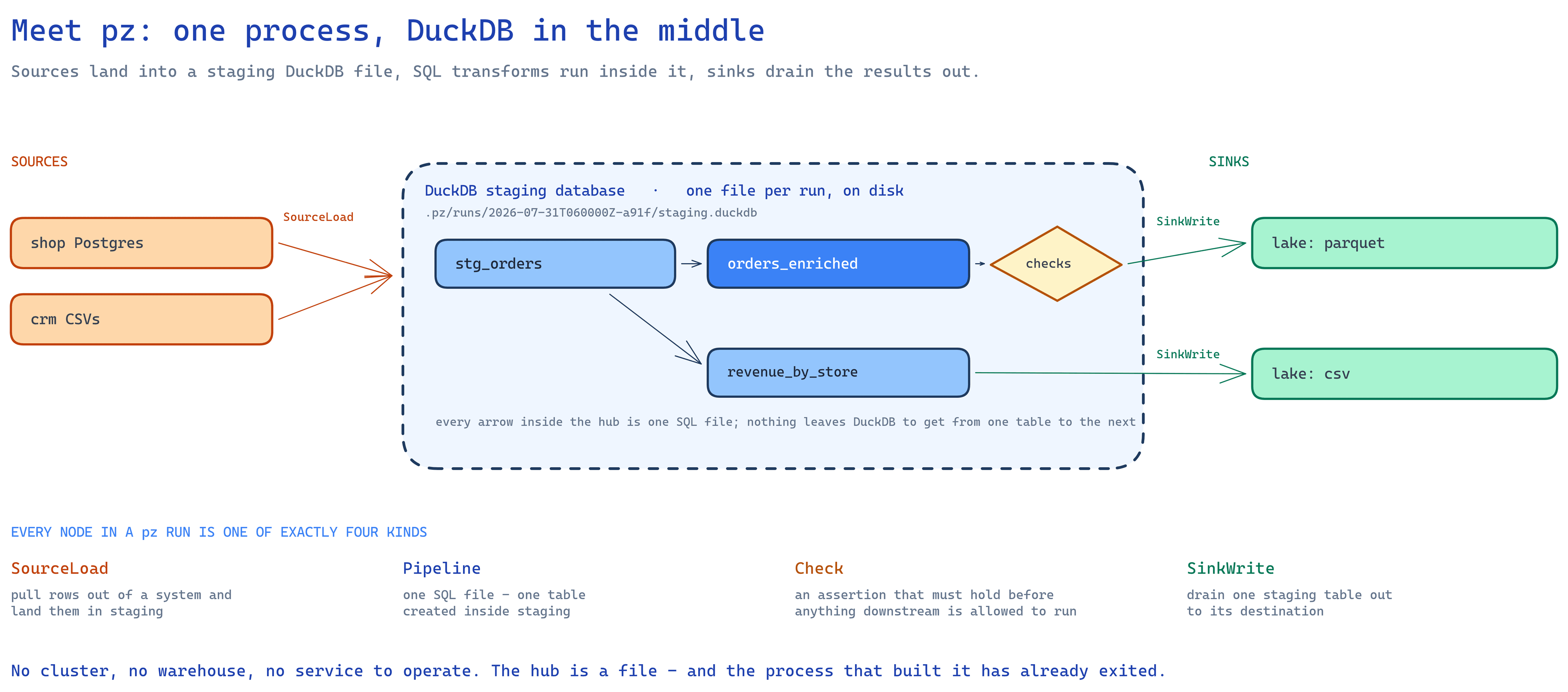
Sources land data into a disk-backed DuckDB database (.pz/runs/<id>/staging.duckdb),
pipelines transform inside DuckDB at columnar speed, and sinks drain results out.
Independent nodes run in parallel; execution is always materialize, then drain - even the
INSERT INTO form stages the table first and writes atomically, so a half-failed run never
leaves a half-written destination (article 4’s replace-safely rule).
Where both ends of an edge speak SQL, pz hands DuckDB a fragment and steps out of the way -
the data never enters .NET at all; where they don’t, it streams as Arrow batches rather than
row by row. That is measured, not asserted: a million rows SQL Server to SQL Server, end to
end, takes 10.5 s on a laptop, and pz plan prints the memory budget before you run.
pz run <name> runs one flow - that node plus everything upstream and downstream. On a
project with several independent flows, bare pz run refuses (so you never run the world
by accident) and --all is the explicit everything.
The reunion tour: Part I, feature by feature
Section titled “The reunion tour: Part I, feature by feature”Ingestion (article 4). Talking to a new source is a connector. Eight ship
first-party - local files, Postgres, SQL Server, MySQL, SQLite, S3, Azure Blob, and HTTP
APIs - and there’s a documented ABI for writing your own. pz pushes work down to capable sources: it uses
DuckDB’s own SQL parser to extract which columns and filters your pipeline actually needs
and hands them to the connector (ReadHints), so SELECT id, amount ... WHERE updated_at >
becomes a narrow query at the source, not a full-table drag. Failures are classified
transient-or-permanent, and transient ones retry with backoff - tunable per call:
source('shop', 'orders', retry: { max_attempts: 3 }).
Incremental and CDC (articles 3–4). Going incremental is one line in the SQL:
FROM {{ source('shop', 'orders') }}WHERE updated_at > {{ watermark('shop', 'orders') }}That comparison is the declaration - pz reads it (again via DuckDB’s parser, not
regex), types the cursor from the stored watermark, and has the connector fold the
condition into extraction. The watermark advances only after every downstream sink write
commits - article 4’s deliver-first-then-advance rule, enforced by the engine rather than
by your discipline. pz state show/rollback/set/clear gives you article 8-style visibility
and article 3-style rebuild-from-scratch control over that memory. For deletes and
cursor-less tables, sync: { mode: cdc } reads Postgres or SQL Server change logs - each
run drains what changed since the last run’s position, with on_delete: delete|soft|ignore
deciding what a source delete does downstream. Backfill safety is first-class too: bounded
windows (initial / max_window / until) slice big history into article 3’s gentle
pieces, with per-source concurrency caps and a circuit breaker for the truly bad night.
Delivery guarantees (article 4). Sink strategies are exactly the three you know -
replace, append, merge (with keys:) - and the guarantee matrix is a stability
contract: merge and replace are effectively-once; append is at-least-once. Here’s the
detail that shows the philosophy: pairing an incremental read with a plain append is a
compile error (PZ0214) unless you explicitly write duplicates: accept. The tool makes
you sign for the double-counting risk in code review, where article 9 said such decisions
belong.
Transformation (article 5). Layers are just ref() chains; the engine is DuckDB, so
the SQL is real analytical SQL over columnar data. Determinism is a project-wide rule -
run artifacts are byte-stable, which makes article 9’s diff-before-deploy an actual diff.
Orchestration (article 6). Recall that article’s split: orchestration is two separate
jobs - deciding in what order the steps run, and deciding when a run starts. pz
builds in the first job completely: it sorts the DAG into dependency order, runs
independent branches in parallel, and skips exactly the downstream cone of a failed node.
The second job is deliberately not built in - you start pz run from whatever time-based
scheduler you already have (cron, Windows Task Scheduler, a CI job on a timer). In
article 6’s terms, pz is the one-command-that-runs-the-DAG half of the honest small-team
architecture, and your existing scheduler is the other half. The morning-after story is pz retry: it re-executes only what didn’t
succeed, reuses the failed run’s already-landed source data where it’s provably safe
(falling back to re-extraction with a note when not), and carries already-committed sink
writes forward - the 4-minute rerun instead of the 40-minute one.
Validation (article 7). Checks are DAG nodes; a failed check blocks its downstream
sink write, so unvalidated data structurally can’t reach the dashboard. Beyond runtime
checks, pz validate runs tiers of pre-run validation - config, templates, DAG shape,
and your rendered SQL against DuckDB’s own parser - and reports all errors at once,
each with a PZ#### code naming the file, the cause, and a next step. pz validate --connect adds live connectivity and schema-drift probes: article 4’s drift, caught at 3
p.m. instead of 3 a.m. Drift that changes between probes is caught again at run time -
on_source_drift: ignore | warn | fail decides whether a source that grew a column is
noted or stops the run, and pz schema accept blesses the new shape as the baseline once
you’ve looked at it.
Monitoring (article 8). Every run emits one event stream, rendered as console lines or
as NDJSON (--log-format json) under a documented, append-only contract - article 8’s
structured events, ready for whatever watches your ops world. Run history persists as
run_results.json per run; metrics flow through OpenTelemetry (including a
pz.run.completed metric for the did-it-even-run heartbeat); exit codes are the honest
machine-readable signal (0 ok, 1 node failures, 2 config error, 3 fatal). Old runs’
staging databases are swept automatically by a retention policy, and for ephemeral hosts
(containers that vanish after each run) state need not live on local disk at all: a SQL
Server backend moves watermarks, run history, and events into a database, and an HTTP
backend hands watermarks and sync state to a server over a run-scoped endpoint.
Best practices (article 9). Mostly, pz makes the checklist the path of least
resistance: everything is files in git; loads are staged and atomic; secrets are ${ENV}
references that never appear in logs or artifacts; the scaffold ships a runnable sample;
pz plan and pz compile let you inspect the graph and strategies without touching data.
Agents (article 9’s reviewability, extended). pz mcp serves the current project to
an AI coding agent over the Model Context Protocol: 22 typed tools for introspecting the
DAG, validating, authoring connections and pipelines, and reading the docs. Execution is
opt-in - pz_run, pz_retry, and pz_run_results are registered only when the server is
started with --allow-run, so an agent pointed at a project can read and edit it without
being able to touch data by accident.
The CLI at a glance
Section titled “The CLI at a glance”| Verb | What it does |
|---|---|
pz init [--template <id>] / pz restore |
Scaffold a project from a built-in template, minimal by default / fetch declared connector packages |
pz validate [--connect] |
All pre-run validation, aggregated; optionally probe sources live |
pz compile / pz plan |
Build the DAG / print per-node execution strategy - no execution |
pz run [name | --all] |
Execute a flow, or everything |
pz test |
Run only the checks (and what they need) |
pz retry |
Re-run only what failed, reusing safe staged data |
pz ls / pz connectors |
List nodes in topological order / list connectors |
pz connector test <package> |
Check that a third-party connector package speaks the protocol correctly |
pz state … / pz cdc … / pz clean |
Inspect and manage watermarks, CDC positions, and old runs |
pz schema accept |
Accept a drifted source’s observed schema as the new baseline |
pz mcp [--allow-run] |
Serve the project to an AI agent over MCP |
The takeaway
Section titled “The takeaway”pz is Part I with the boilerplate removed: connections declared once, ETL written as SQL
whose own source()/ref()/sink() calls are the DAG, checks as one-liners that gate
the outputs, watermarks and delivery guarantees enforced by the engine, and a run that
tells its story as structured events.
Its boundaries are as deliberate as its features, and worth stating plainly: pz is batch
(it runs to completion and exits), it is one machine (DuckDB in one process - no cluster
mode), it brings no scheduler and no UI, its transformations are SQL and nothing else, and
it is pre-release (v0.x, so pin versions and read release notes). Inside that profile -
scheduled batch ETL, volumes a single machine handles, sources within its connector set, a
team that thinks in SQL - it packs an outsized amount of Part I into one dependency-light
CLI. Outside it, the tools to reach for are the ones Part I already named: streaming
systems for seconds-fresh decisions, Spark or a distributed warehouse when a run outgrows
one machine, an orchestration platform when many teams’ pipelines depend on each other.
Closing: back to Monday morning
Section titled “Closing: back to Monday morning”We opened this series with Dana, two hours of copy-paste, and a number nobody could quite
audit. Ten articles later, the same Monday looks like this: a crontab line fires at 06:00;
connectors extract incrementally and politely; SQL layers rebuild deterministic tables
inside a workbench database; checks gate what the dashboard is allowed to see; a failed
night is one pz retry from healed; and every run leaves a structured, queryable account
of itself. The owner asks “how did we do last week?” and the answer is on a screen before
the question is finished - with a timestamp that says exactly how fresh it is.
No single tool made that true, and that’s the real lesson. Pipelines earn trust through a
stack of small, boring decisions - idempotent loads, derived DAGs, checks at the seams,
honest failure - applied consistently. pz is one compact way to get those decisions made
for you; whatever tool you use, you now know which decisions they are, and why each one is
there. That knowledge transfers. Tools change; Monday morning always comes.
Back to the table of contents.